Managing telecom bills is a routine part of living in the UAE, especially for residents who rely on mobile data, calls, and home internet for work and personal communication. One of the most widely used telecom providers in the country is Etisalat, known for its reliable mobile networks, internet services, and digital solutions.
Among its many offerings, postpaid plans are extremely popular because they provide flexibility, premium features, and convenient billing options. However, understanding how Etisalat postpaid bill payment works is essential to avoid service interruptions and extra charges.
In this detailed guide, we’ll explore everything you need to know about Etisalat postpaid bill payment—from checking your bill and paying online to managing monthly charges efficiently while living in the United Arab Emirates.
What Is an Etisalat Postpaid Plan?
A postpaid plan is a telecom subscription where customers use mobile or internet services first and receive the bill at the end of the billing cycle.
Unlike prepaid plans, where you pay in advance, postpaid plans allow you to:
- Use calls, SMS, and data during the month
- Receive a monthly bill based on usage
- Pay the bill before the due date
Many residents in cities like Dubai and Abu Dhabi prefer postpaid plans because they often include higher data limits, international calling benefits, and premium services.
How Etisalat Postpaid Billing Works
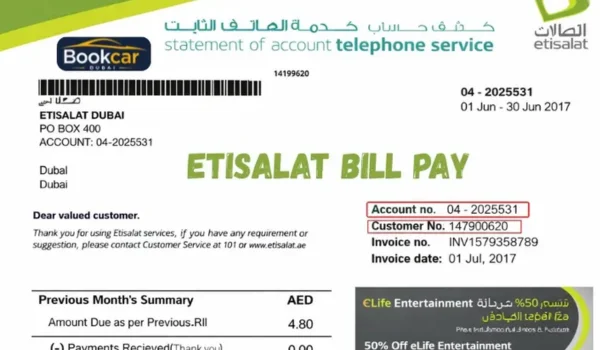
Every Etisalat postpaid customer receives a monthly billing statement. The billing cycle usually lasts 30 days, after which the bill is generated.
Your Etisalat postpaid bill typically includes:
- Monthly Plan Charges
This is the fixed cost of your mobile or internet plan.
For example, if you subscribe to a monthly data plan, the base fee appears here.
- Additional Usage Charges
These may include:
- Extra data usage
- International calls
- Roaming charges while traveling
- Premium services
- Device Installment Payments
If you purchased a smartphone through Etisalat on installment, the monthly device payment will be included in your bill.
- Taxes and Fees
The UAE applies Value Added Tax (VAT) to telecom services, which appears in the billing summary.
How to Check Your Etisalat Postpaid Bill
Checking your bill regularly helps you monitor your usage and avoid surprises.
- Using the Etisalat Website
The official website of Etisalat allows users to easily check their bills.
Steps:
- Visit the Etisalat website.
- Log in to your account.
- Go to the My Account or Billing section.
- Select View Bill.
Here you can see:
- Total bill amount
- Payment due date
- Detailed usage breakdown
- Using the My Etisalat UAE App
The My Etisalat UAE mobile app is one of the easiest ways to check your postpaid bill.
Steps:
- Download the My Etisalat UAE App.
- Log in with your registered mobile number.
- Tap the Billing tab.
- View your current balance and due date.
The app also shows your data usage, call history, and payment history.
- Checking via SMS
Etisalat also allows customers to check their outstanding bill through SMS services.
By sending a simple request to the service number, customers can receive their bill amount instantly via text message.
This option is useful when you need quick access to your bill without using the internet.
Etisalat Postpaid Bill Payment Methods
Etisalat provides several payment options to make the process quick and convenient.
- Online Payment Through the Etisalat Website
One of the most common payment methods is paying directly through the website.
Steps:
- Go to the Etisalat official website.
- Select Quick Pay or Bill Payment.
- Enter your postpaid mobile number.
- Choose your payment method (credit or debit card).
- Confirm the payment.
Payments are usually processed instantly.
- Paying Through the My Etisalat UAE App
The mobile app offers a fast and simple payment experience.
Steps:
- Open the My Etisalat UAE App.
- Tap Pay Bill.
- Select your postpaid account.
- Enter payment details.
- Complete the transaction.
The app allows users to save payment cards for faster future payments.
- Bank App Payments
Many banks in the United Arab Emirates support Etisalat bill payments through their mobile banking apps.
Steps:
- Log in to your bank’s mobile app.
- Go to Bill Payment.
- Select Etisalat as the provider.
- Enter your mobile or account number.
- Confirm the payment.
This option is ideal for people who prefer managing all their bills from one platform.
- AutoPay for Automatic Payments
Etisalat offers an AutoPay feature that automatically deducts your monthly bill from your credit card or bank account.
Benefits include:
- No risk of late payments
- Automatic monthly deductions
- Continuous service without interruption
- Less time spent managing bills
Many busy professionals prefer AutoPay because it eliminates the need to remember due dates.
How to Download Your Etisalat Postpaid Bill
Sometimes you may need a copy of your telecom bill for documentation purposes.
Etisalat allows users to download their bill in PDF format.
Steps:
- Log in to your Etisalat account via the website or mobile app.
- Go to Billing History.
- Select the billing month.
- Click Download PDF.
Downloading your bill can be useful for:
- Expense tracking
- Business reimbursements
- Proof of address verification
What Happens If You Don’t Pay Your Postpaid Bill?
If you miss your Etisalat postpaid bill payment, certain actions may occur.
These can include:
Late Payment Charges
Etisalat may apply additional fees for overdue payments.
Service Restrictions
Outgoing calls or data services may be limited.
Temporary Disconnection
If the bill remains unpaid for an extended period, services may be suspended until the balance is cleared.
To avoid these issues, it’s best to pay your bill before the due date.
Tips to Manage Your Etisalat Postpaid Bills
Here are a few practical tips to keep your telecom expenses under control.
Monitor Your Usage
Regularly check your data usage through the mobile app to avoid exceeding your plan limits.
Enable Bill Notifications
Turn on notifications so you receive reminders before the payment deadline.
Choose the Right Plan
If your bill seems high every month, consider switching to a more suitable plan.
Download Monthly Statements
Keeping digital records helps with budgeting and financial planning.
Benefits of Using Etisalat Postpaid Plans
Postpaid plans offer several advantages compared to prepaid services.
Greater Flexibility
You can use services without worrying about recharging frequently.
Premium Benefits
Many postpaid plans include:
- Higher data limits
- International calling packages
- Roaming benefits
Convenience
Monthly billing makes expense management easier.
The Future of Telecom Billing in the UAE
The telecom industry in the UAE is rapidly evolving with new digital technologies. Companies like Etisalat are introducing innovative tools to improve the customer experience.
Future billing features may include:
- AI-powered spending insights
- Smart payment reminders
- Integrated digital wallets
- Automated usage alerts
These advancements will make telecom billing even more convenient for residents.
Final Thoughts
Etisalat postpaid bill payment is designed to be simple, flexible, and convenient for users across the United Arab Emirates. With multiple ways to check bills, make payments, and download statements, managing your telecom expenses has never been easier.
Whether you choose to pay through the website, mobile app, bank app, or AutoPay, staying on top of your postpaid bill ensures uninterrupted connectivity and peace of mind.
By understanding how the billing system works and using the digital tools provided by Etisalat, you can manage your telecom services efficiently while enjoying reliable communication across the UAE.
